Address and GPS coordinates
The street address, latitude and longitude, altitude and GPS accuracy, updated live as you walk.

GPS Camera & Timestamp. Job site photo proof.
Free, with optional PinCam Pro. No account needed.
Preview
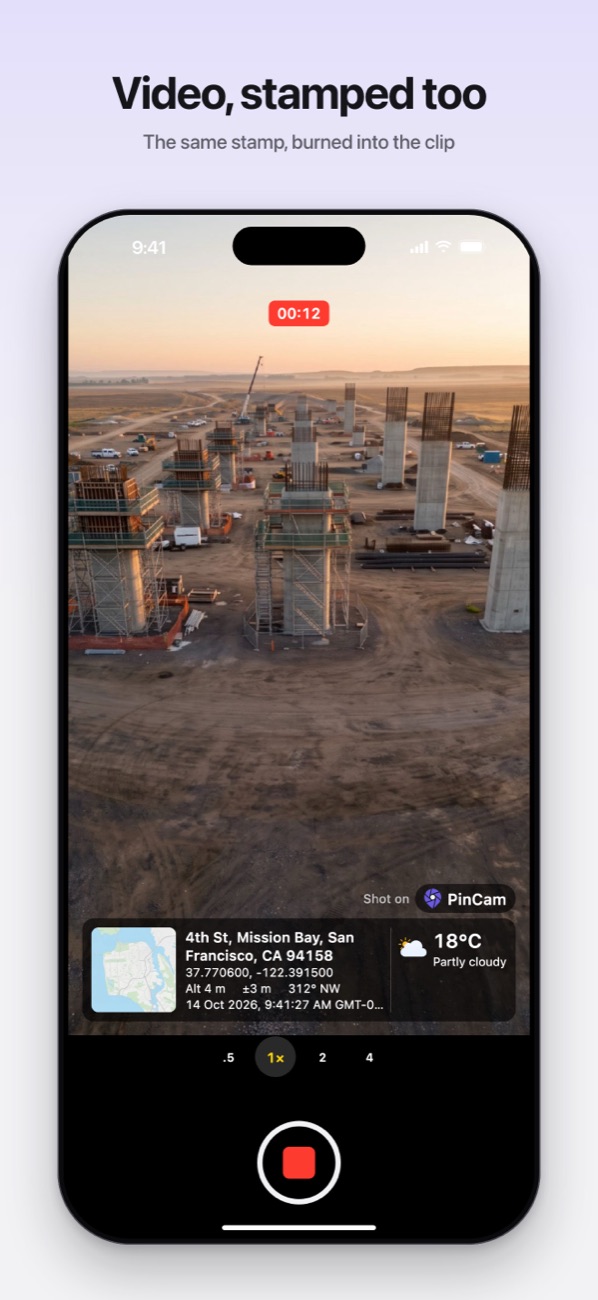
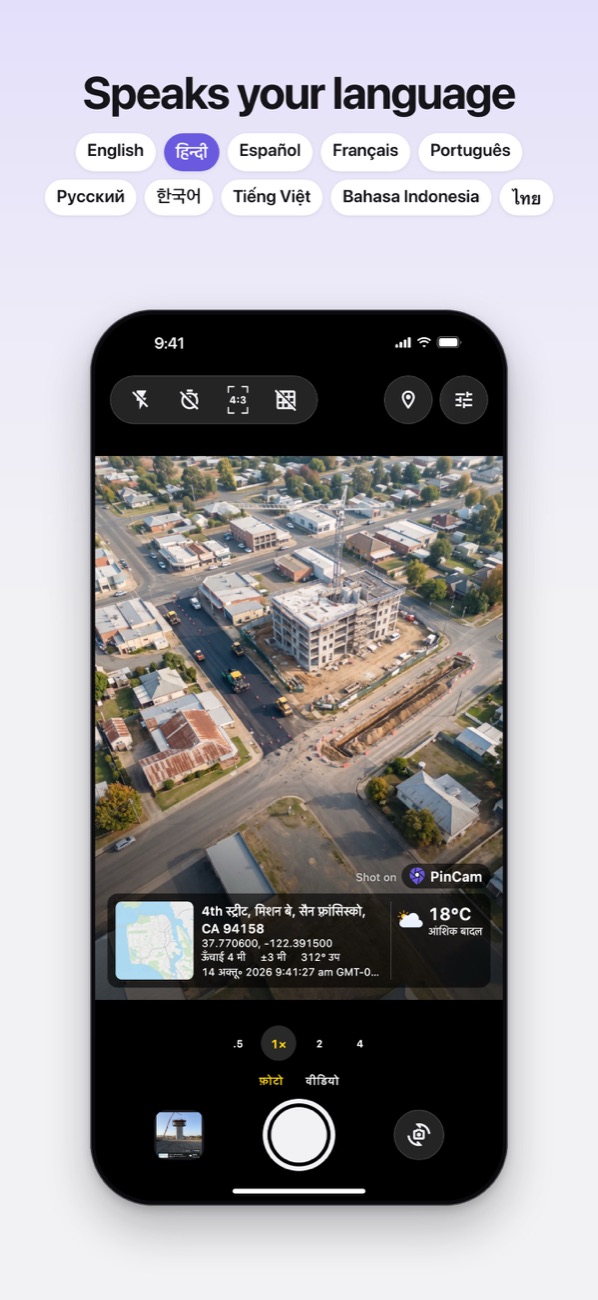
Drawn from the app itself, with sample data.
The stamp
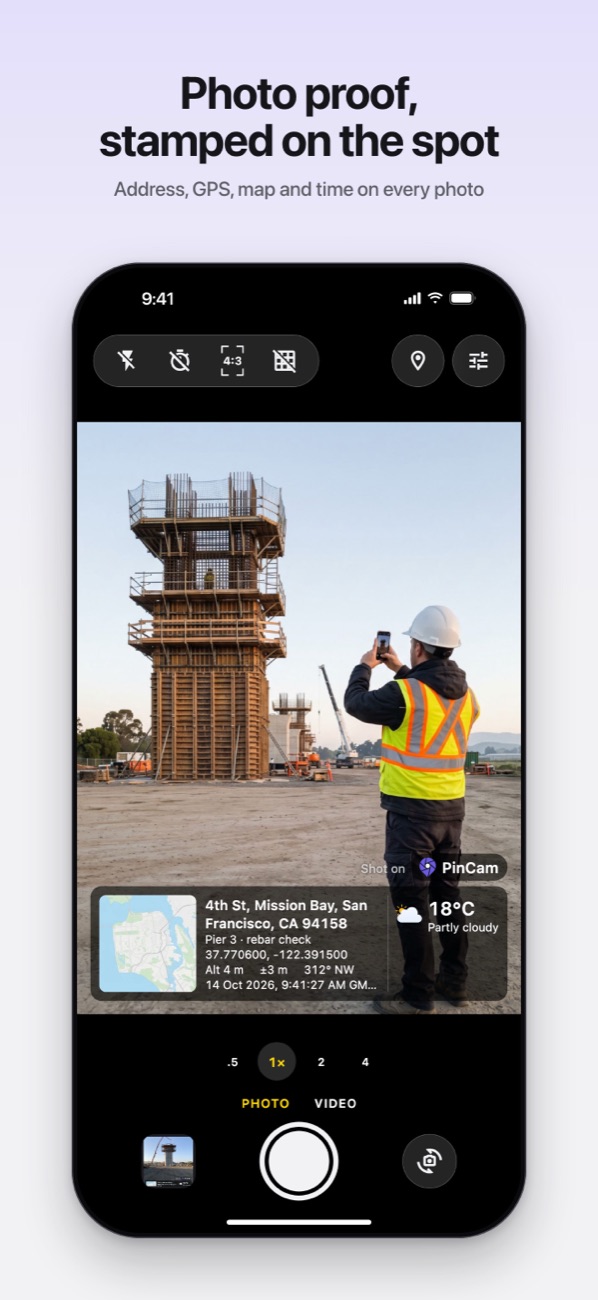
Point, shoot, done. PinCam draws the stamp onto the photo itself, not a screenshot of the screen, so the proof travels with the picture wherever you send it.
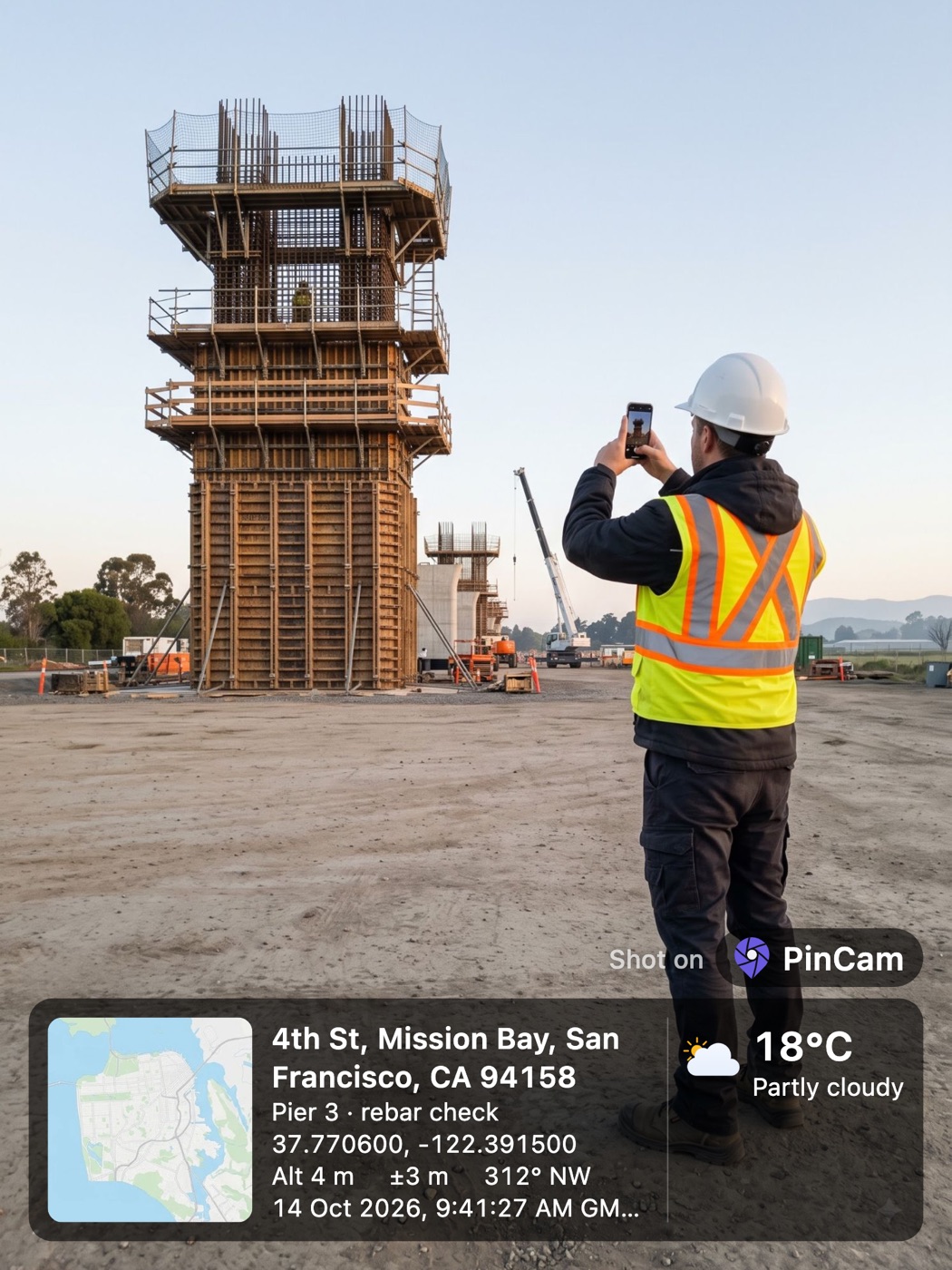
Street, area, city and postcode, looked up for you. At a saved site, its own address lines instead.
Latitude and longitude in decimal or degrees, minutes and seconds, with height above sea level and GPS accuracy.
A snapshot of where you stand, with a pin. Terrain, satellite and hybrid styles with PinCam Pro.
When it was taken and which way the camera faced, from a true north compass.
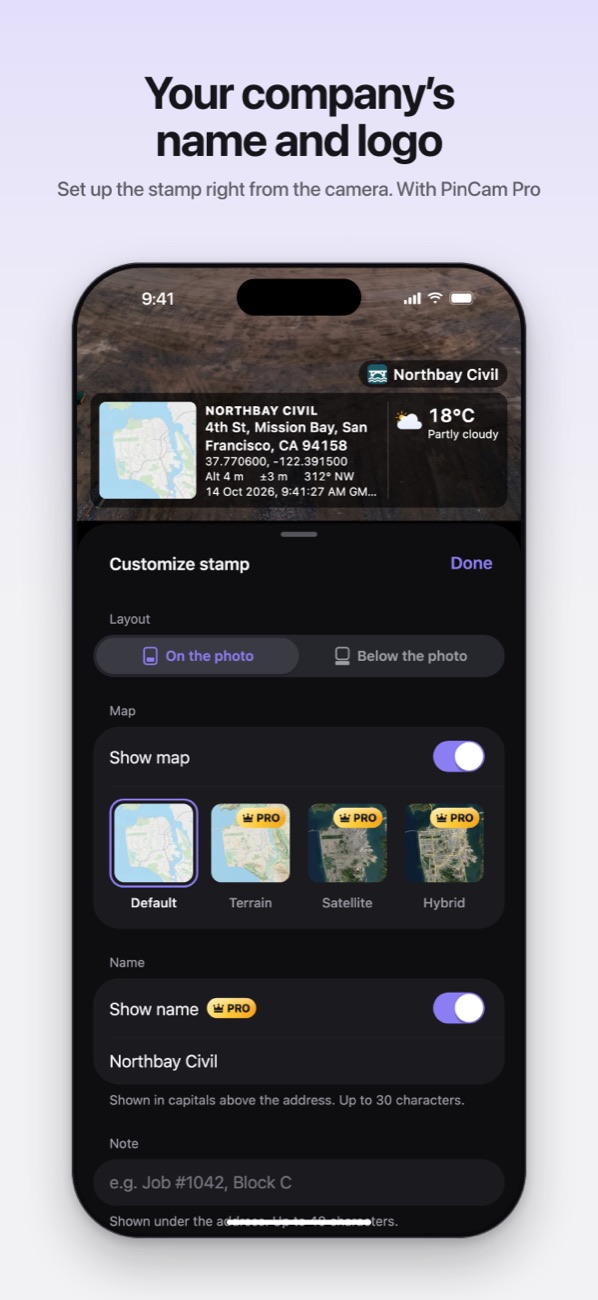
One line of your own, like a job number or "Block C, 3rd floor".
The temperature at that moment, from MET Norway. Wind and humidity with PinCam Pro.
About this app
PinCam is a GPS camera for people who send photos as proof of their work. Every photo and video is stamped with where and when it was taken: the address, GPS coordinates, a small map, the date and time, and, if you want them, altitude, GPS accuracy, compass heading, the weather and a note of your own. Then it files the photo under the job site, city and area, so you can find it again in seconds.
We built it for contractors, inspectors, surveyors, installers and field teams, who all get asked the same two questions about a photo: where was this, and when? PinCam answers both on the picture itself, so a report, a client or a colleague never needs a separate map pin or a note on paper.
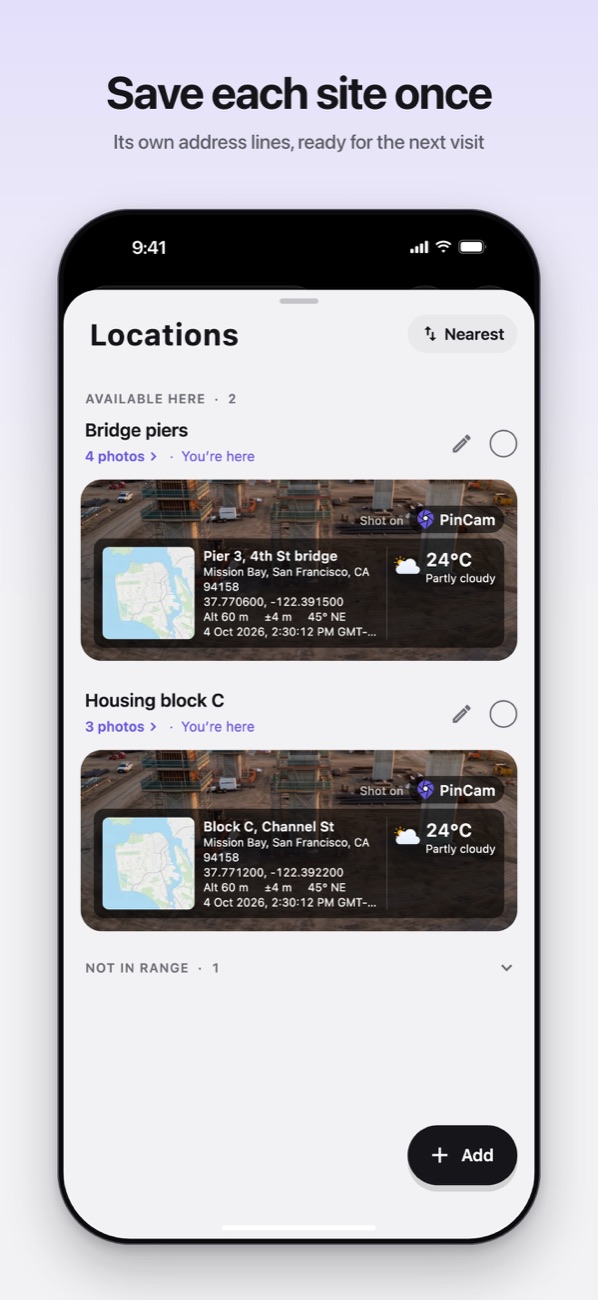
Save a job site once, with a pin on the map, a radius and its own address lines, and pick it when you arrive. Photos taken there carry the site's address lines and land in its own folder in the gallery. Add your company's name and logo to the stamp with PinCam Pro, and every photo looks like it came from you.
It is a proper camera, too. The shutter never waits for GPS, so you never miss a shot, and the stamp you see on the viewfinder is exactly the stamp you get. Tap to focus, slide to brighten, switch between 0.5×, 1×, 2× and 4×, shoot in 4:3, 3:2, 16:9 or square, line things up with a grid and a level, and switch to Video to get clips with the stamp burned in.
Lost signal on a site or a mountain road? PinCam keeps going. GPS works without mobile data, so the photo is still stamped with coordinates, date and time, and the gallery fills in the address the moment you are back online. The location is also saved inside the photo's EXIF data, so Google Photos, Apple Photos and mapping tools can place it on a map.
And it is private by design. There is no account to create. Your photos stay on your phone and go only where you choose to share them. PinCam uses your location only while the camera is open, never in the background. It speaks English, Hindi, Spanish, French, Portuguese, Russian, Korean, Vietnamese, Indonesian and Thai, stamp included.
Features
The street address, latitude and longitude, altitude and GPS accuracy, updated live as you walk.
The exact date and time on the photo and in its metadata. Made for progress reports and proof of visit.
One line of your own under the address: a job number, a block, a floor, a defect.
Save a site once with its own address lines. Its photos get their own folder. One free, unlimited with Pro.
Record clips with the stamp burned in and the location in the file. 1080p free, 4K with Pro.
A Google map snapshot of your exact spot, with a pin. Terrain, satellite and hybrid with Pro.
See which way the camera points, like "45° NE", corrected from magnetic to true north.
The temperature from MET Norway, in °C or °F. Wind and humidity with Pro.
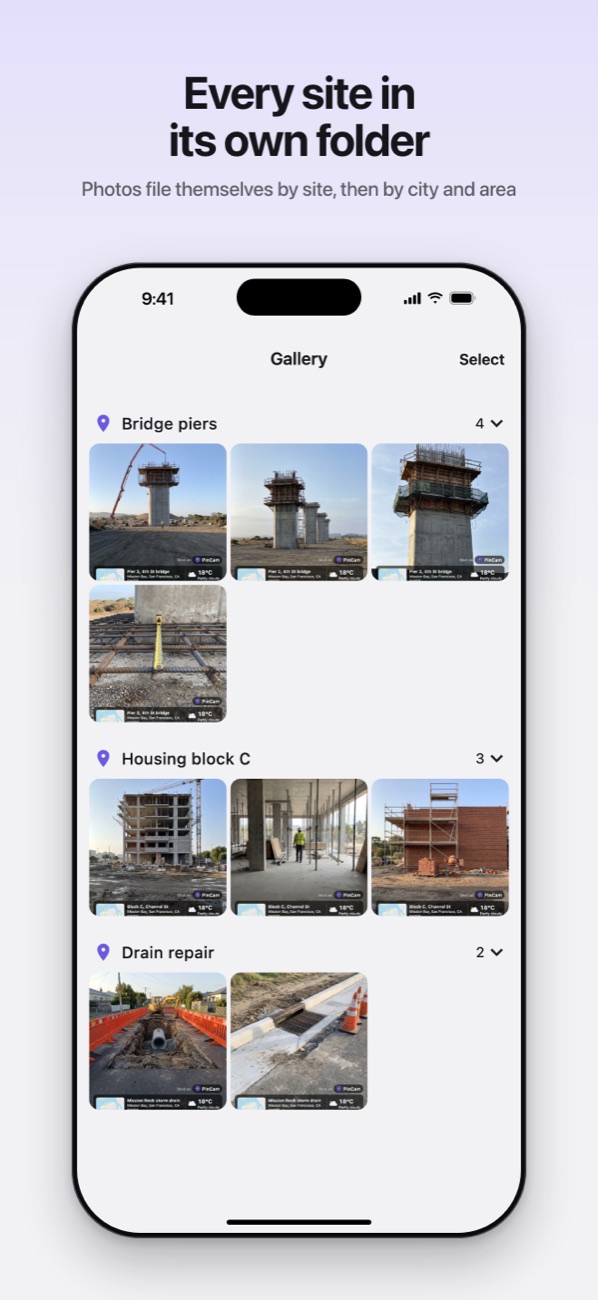
Photos are grouped by saved site, then city and area, automatically. Share or delete several at once.
No signal? Photos are still stamped with coordinates, date and time. Addresses arrive when you reconnect.
GPS position, altitude, direction and time are written into the file, so the location survives any app.
On the photo as a translucent card, or below it in a solid strip, so your subject is never covered.
Tap to focus, slide to brighten, 0.5× to 4× zoom, grid and level, self timer, flash and four photo shapes.
English, Hindi, Spanish, French, Portuguese, Russian, Korean, Vietnamese, Indonesian and Thai, on the stamp too.
Brand every photo with your company’s name above the address and your own logo on the badge.
Made for
Daily site photos with the location, date and time on them. Progress reports that answer the questions before they are asked.
Show exactly where a meter, pole, pipe or panel was checked and when the visit happened.
Listing and survey photos with the address on every frame. No more mixing up two flats on the same street.
A geotagged, time stamped photo is the simplest proof that the job was done, at the right place.
Plot photos, crop checks and community visits with coordinates and altitude, even far from a network.
Document damage with the address, time and weather that day, all in one photo.
Every photo remembers the town, the street, the altitude and the weather. Your trip, sorted by city.
Trailheads, summits and campsites with GPS coordinates and height above sea level.
How it works
Allow the camera and location. The map, address and time appear live on the viewfinder.
Long press the stamp to choose what shows and add a note. Save your job site once, and pick it when you arrive.
Stamped photos and videos save to a PinCam album and to the site’s folder in the app, ready to send on WhatsApp, email or anywhere.
App privacy
No sign up, no sign in, no profile. Open the app and shoot.
Photos, their locations and your settings are kept on your device. We have no servers to send them to.
PinCam reads GPS only while the camera is on screen. Never in the background.
A photo leaves your phone only when you tap Share and pick where it goes.
The details, including the few services PinCam talks to for maps, addresses, weather and ads, are in the PinCam privacy policy.
What's new
The first release of PinCam: photos and videos stamped with the address, GPS coordinates, a map, the date, time and weather; a note line; saved job sites; a gallery sorted by site, city and area; offline support; ten languages; and PinCam Pro, with your company name and logo.
Information
Questions
PinCam is a GPS camera for iPhone, with Android to follow. Every photo and video you take is stamped with the address, GPS coordinates, a small map, the date and time, and, if you like, altitude, GPS accuracy, compass heading, the weather and a note of your own. Photos are then sorted by saved job site, city and area inside the app.
Yes. Everything a location and time stamp needs is free: the stamp, the note, one saved site, 8 MP photos and 1080p video. A small banner shows in the gallery, never on the camera. Quality extras such as satellite maps, 48 MP photos and 4K video can be unlocked for 2 hours by watching a short video, or for good with PinCam Pro. Your company name and logo and unlimited saved sites come with PinCam Pro: monthly, yearly with a 7-day free trial, or a one-time lifetime purchase.
Yes. Save a site once with a pin on the map, a radius and its own address lines, and pick it when you arrive. Photos taken there carry those address lines and are filed under the site's name. One saved site is free; PinCam Pro saves as many as you need.
Yes. Switch to Video and the stamp is burned into the clip, frozen at the moment you started recording, with the location also written into the file. 1080p is free; 1080p at 60 fps and 4K come with PinCam Pro.
Yes. GPS works without a data connection, so offline photos are still stamped with coordinates, date and time. The map shows when its tiles are already cached, and the gallery looks up the address and files the photo by city as soon as you are back online.
Yes. Besides the visible stamp, PinCam writes GPS latitude, longitude, altitude, the camera's direction and the time into the photo's EXIF metadata, so Google Photos, Apple Photos and mapping tools can place it on a map.
Yes. Switch the map, address, coordinates, altitude, GPS accuracy, date and time, compass heading and weather on or off, and add a one-line note such as a job number. Pick metric or imperial units, Celsius or Fahrenheit, decimal or degrees-minutes-seconds coordinates, and place the stamp on the photo or in a strip below it.
Yes, with PinCam Pro. Add your company's name above the address and your own logo to the badge on every photo. It is made for site reports, inspections and client work.
No. PinCam uses your location only while the camera is open on your screen. There is no account and your photos stay on your phone unless you choose to share them.
PinCam is on the App Store for iPhone, free to download, in most countries. It is not currently available in the EU or China mainland. Android comes next, on Google Play.
Free on the App Store, no account needed. On Android? Drop us a line and we will tell you the day it lands on Google Play. Feedback and feature ideas are welcome too.
Download on the App Store